
The Lux Creative Ecosystem:
Integrated Systems Architecture for Revenue Operations (RevOps)
Integrated Systems Architecture for Revenue Operations (RevOps)
The Vision: Architecting Systems for Organizational Success
In high-growth creative studios, organizational efficiency is often lost in messy, manual logs that fail to account for the true complexity of the business. I envisioned a solution that could handle a high-volume dataset of 500+ entries while providing a seamless, intuitive experience for the user. This project is a showcase of my ability to architect a complex "back-end" infrastructure and wrap it in a clean, user-centric "front-end" that ensures a system is not just powerful, but actually usable in a fast-paced environment.
In high-growth creative studios, organizational efficiency is often lost in messy, manual logs that fail to account for the true complexity of the business. I envisioned a solution that could handle a high-volume dataset of 500+ entries while providing a seamless, intuitive experience for the user. This project is a showcase of my ability to architect a complex "back-end" infrastructure and wrap it in a clean, user-centric "front-end" that ensures a system is not just powerful, but actually usable in a fast-paced environment.
The Challenge: Managing Complexity at Scale
The primary objective was to transform a fragmented log of job entries into a scalable, automated infrastructure. The system needed to navigate a high degree of variation, including a diverse client roster with uniquely negotiated rates and differing billing periods. I set out to build a tool that could instantly calculate correct totals and assign accurate billing periods regardless of these variations—removing the burden of manual calculation from the creative team and replacing it with a fail-safe, automated workflow.
The primary objective was to transform a fragmented log of job entries into a scalable, automated infrastructure. The system needed to navigate a high degree of variation, including a diverse client roster with uniquely negotiated rates and differing billing periods. I set out to build a tool that could instantly calculate correct totals and assign accurate billing periods regardless of these variations—removing the burden of manual calculation from the creative team and replacing it with a fail-safe, automated workflow.
The Architecture: A Three-Tiered Solution
I designed this ecosystem to move a project from work-entry to payment-received with maximum efficiency:
- The Production Log (The Engine): An automated log that processes 500+ entries, utilizing custom logic to maintain data integrity. I engineered this sheet to account for all client rate variations and billing cycle logic automatically, ensuring the "back-end" handles the heavy lifting.
- The Invoice Generator (The Interface): Drawing on my background in experience design, I created a dynamic generator that filters complex data into a clean, functional layout. This allows users to generate precise billing summaries that can be easily copy-pasted into client-facing documents without navigating raw data.
- The Invoice Tracker (The Oversight): A dedicated tracking environment to manage the lifecycle of an invoice. This sheet provides a clear status of all sent invoices and incoming payments, ensuring every project is accounted for through an organized, high-level overview.
I designed this ecosystem to move a project from work-entry to payment-received with maximum efficiency:
- The Production Log (The Engine): An automated log that processes 500+ entries, utilizing custom logic to maintain data integrity. I engineered this sheet to account for all client rate variations and billing cycle logic automatically, ensuring the "back-end" handles the heavy lifting.
- The Invoice Generator (The Interface): Drawing on my background in experience design, I created a dynamic generator that filters complex data into a clean, functional layout. This allows users to generate precise billing summaries that can be easily copy-pasted into client-facing documents without navigating raw data.
- The Invoice Tracker (The Oversight): A dedicated tracking environment to manage the lifecycle of an invoice. This sheet provides a clear status of all sent invoices and incoming payments, ensuring every project is accounted for through an organized, high-level overview.
Getting the Job Done: Technical Execution, Adaptability, and Upskilling
When I began this project, I was not an expert in advanced Google Sheets logic. However, I recognized that turning my vision for organizational efficiency into a reality required deep technical execution. I taught myself complex formulas in real-time—including nested logic gates, array-based filters, and recursive validation—to build a system that could automatically assign rates and billing periods, calculate totals across hundreds to thousands of records, and instantly filter entries based on multi-variable criteria. This project demonstrates my adaptability and my commitment to upskilling until a technical solution matches the operational need.
While this model utilizes a 500-entry dataset, I engineered the architecture to be scalable enough to handle thousands of records.
Across both the Production Log and the Tracker table, I prioritized UX by establishing a clear visual hierarchy between manual and automated data. By maintaining a white background for manual inputs and a tinted background for automated cells, I created a functional 'affordance' that guides the user and prevents accidental overrides of the underlying logic. To further ensure system integrity, I protected all automated columns, effectively 'fail-safing' the engine against manual errors.
I also engineered the system for seamless scaling by implementing pre-filled formulas across hundreds of additional blank rows. I utilized complex logic to ensure these 'latent' cells remain clean and free of value errors—such as $#VALUE!$ or $#REF!$—until data is initiated. This ensures the studio can scale instantly while maintaining a professional interface that even a novice user can navigate with precision.
When I began this project, I was not an expert in advanced Google Sheets logic. However, I recognized that turning my vision for organizational efficiency into a reality required deep technical execution. I taught myself complex formulas in real-time—including nested logic gates, array-based filters, and recursive validation—to build a system that could automatically assign rates and billing periods, calculate totals across hundreds to thousands of records, and instantly filter entries based on multi-variable criteria. This project demonstrates my adaptability and my commitment to upskilling until a technical solution matches the operational need.
While this model utilizes a 500-entry dataset, I engineered the architecture to be scalable enough to handle thousands of records.
Across both the Production Log and the Tracker table, I prioritized UX by establishing a clear visual hierarchy between manual and automated data. By maintaining a white background for manual inputs and a tinted background for automated cells, I created a functional 'affordance' that guides the user and prevents accidental overrides of the underlying logic. To further ensure system integrity, I protected all automated columns, effectively 'fail-safing' the engine against manual errors.
I also engineered the system for seamless scaling by implementing pre-filled formulas across hundreds of additional blank rows. I utilized complex logic to ensure these 'latent' cells remain clean and free of value errors—such as $#VALUE!$ or $#REF!$—until data is initiated. This ensures the studio can scale instantly while maintaining a professional interface that even a novice user can navigate with precision.
Design-Led Operations
Both environments are visually cohesive, following a design system that complements my personal branding. I opted for a soft, modern color palette that provides enough contrast for high readability while remaining professional enough for client-facing reports. By balancing the experience for all users—from backend administrators to executive stakeholders—I ensured the ecosystem felt like a unified, premium agency experience. I also developed the brand identity and logo for Lux Creative Studio to complete the project’s visual narrative.
Both environments are visually cohesive, following a design system that complements my personal branding. I opted for a soft, modern color palette that provides enough contrast for high readability while remaining professional enough for client-facing reports. By balancing the experience for all users—from backend administrators to executive stakeholders—I ensured the ecosystem felt like a unified, premium agency experience. I also developed the brand identity and logo for Lux Creative Studio to complete the project’s visual narrative.
Production Log
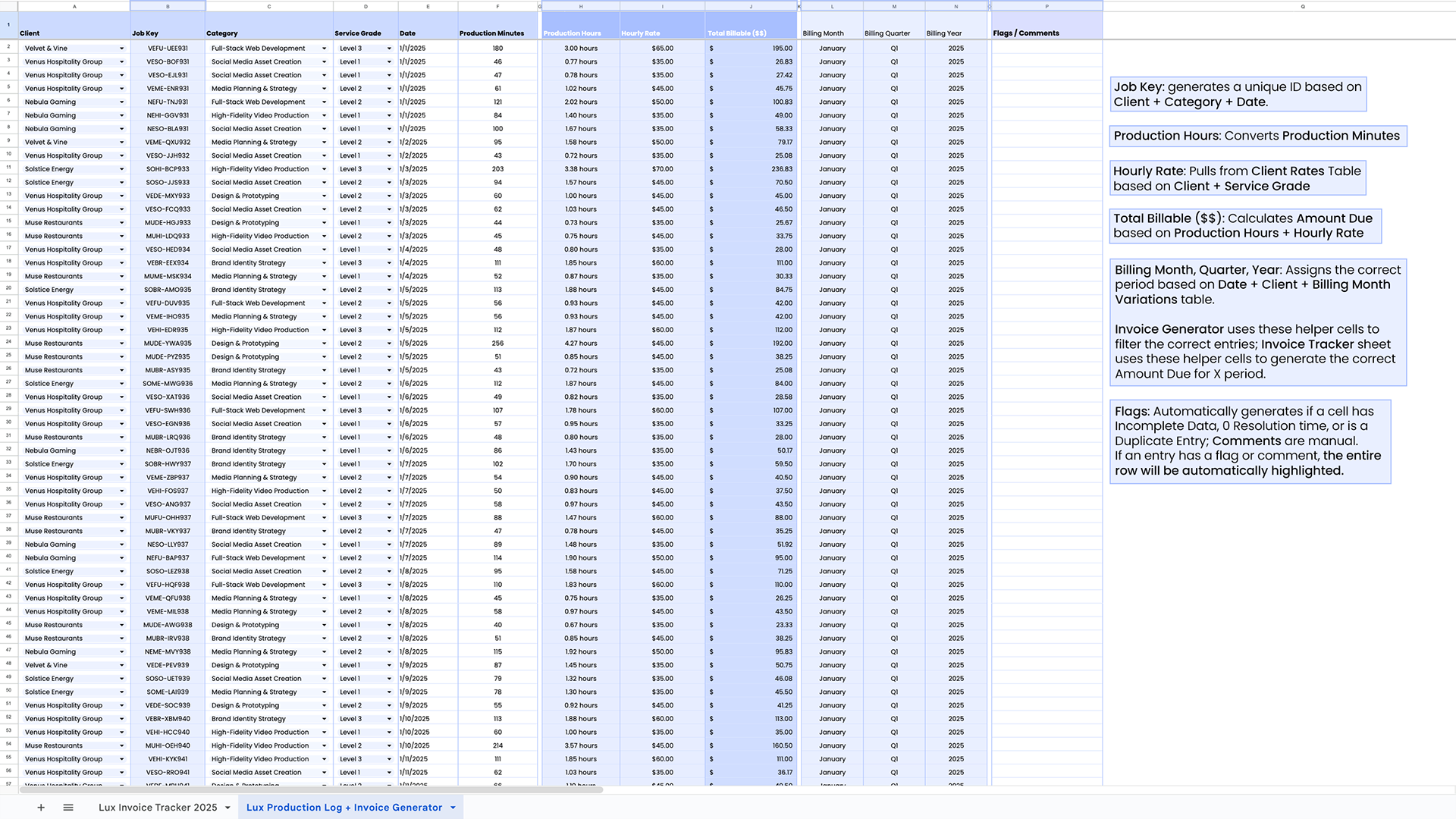
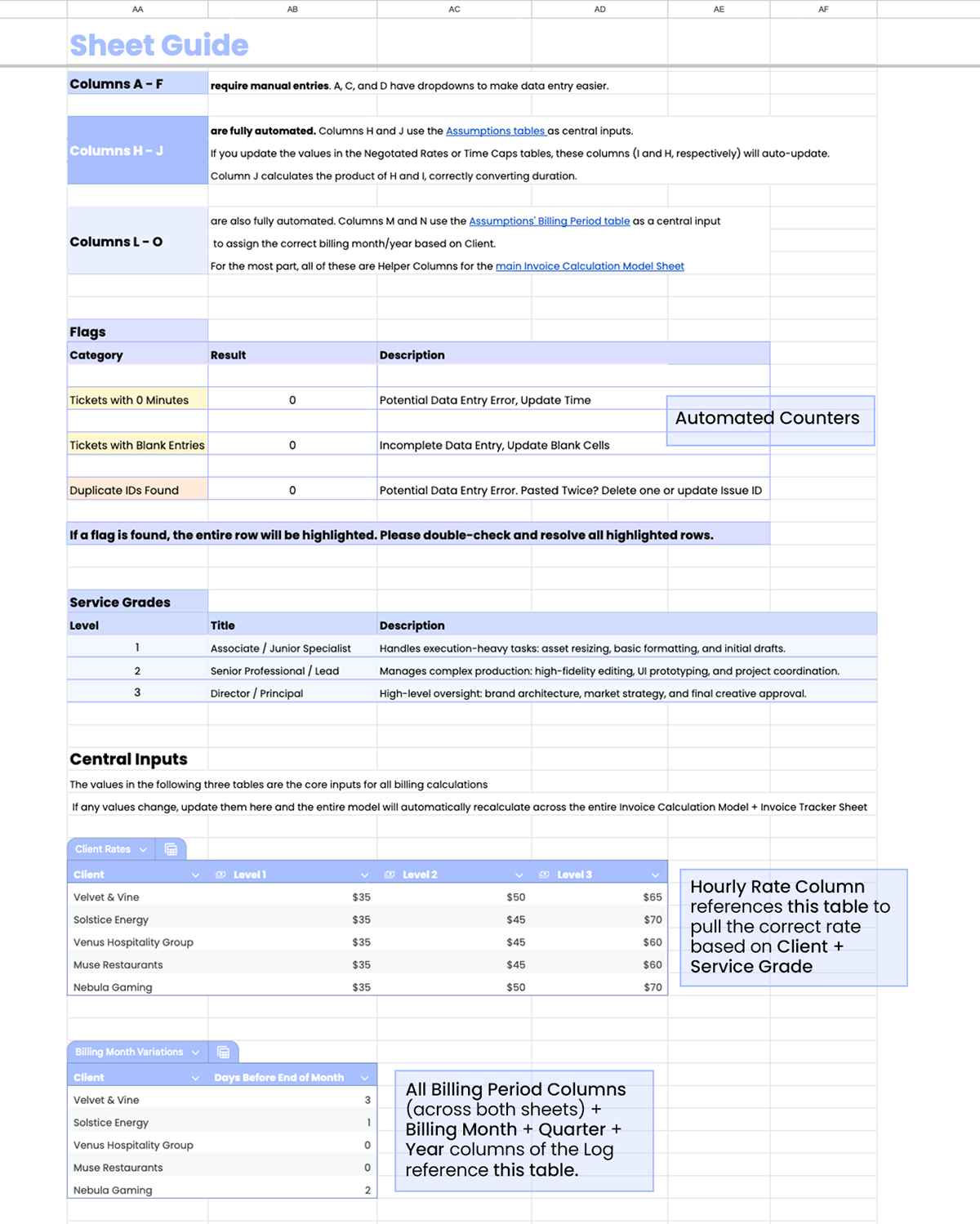
Production Log: When a job is completed, the data is entered here. Dropdowns (Client, Category, Service Grade) and columns in white (Date and Production Minutes) are manual entries. The rest are automatic. Below is a more in-depth visual guide outlining the Log's automated cells, along with a video tutorial illustrating the Log's data entry workflow.
Invoice Generator
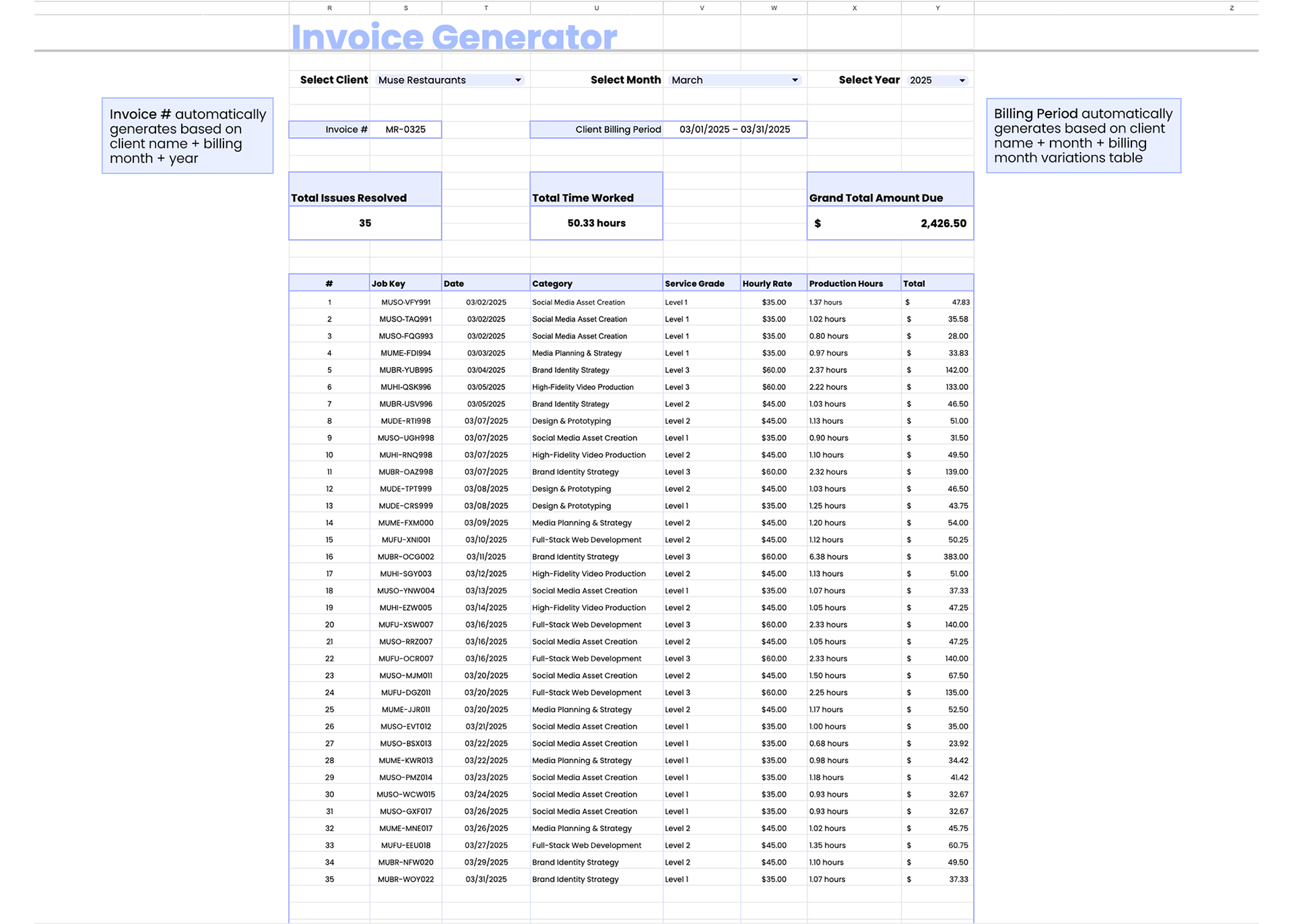
Invoice Generator: Filters the Production Log for a list of entries that match the selected Client, Billing Month, and Billing Year. Once the list is populated, the dynamic summary cards above the list will calculate the correct totals. Below is a more in-depth visual guide, along with a video illustrating the Invoice Generator in action.
Invoice Tracker
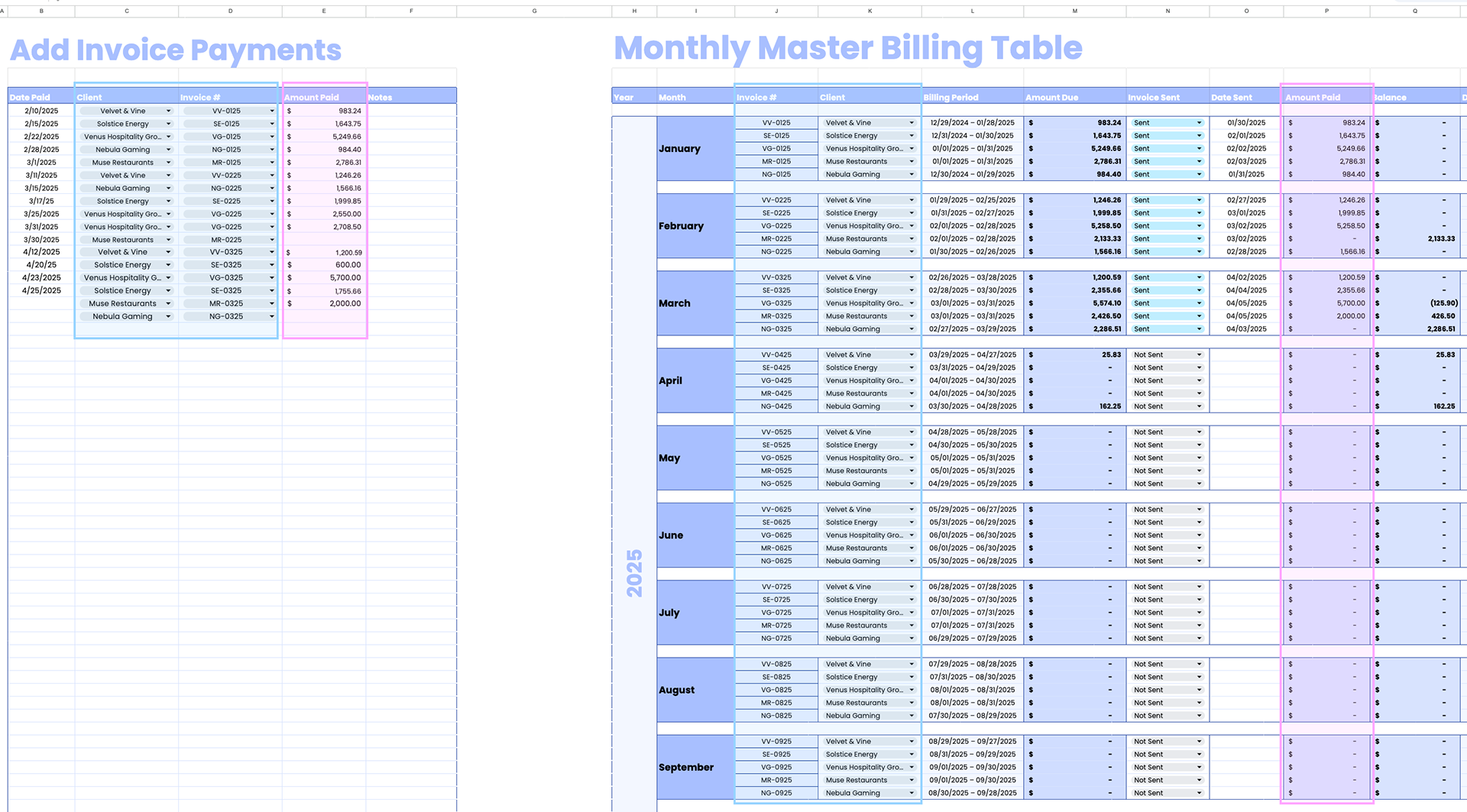
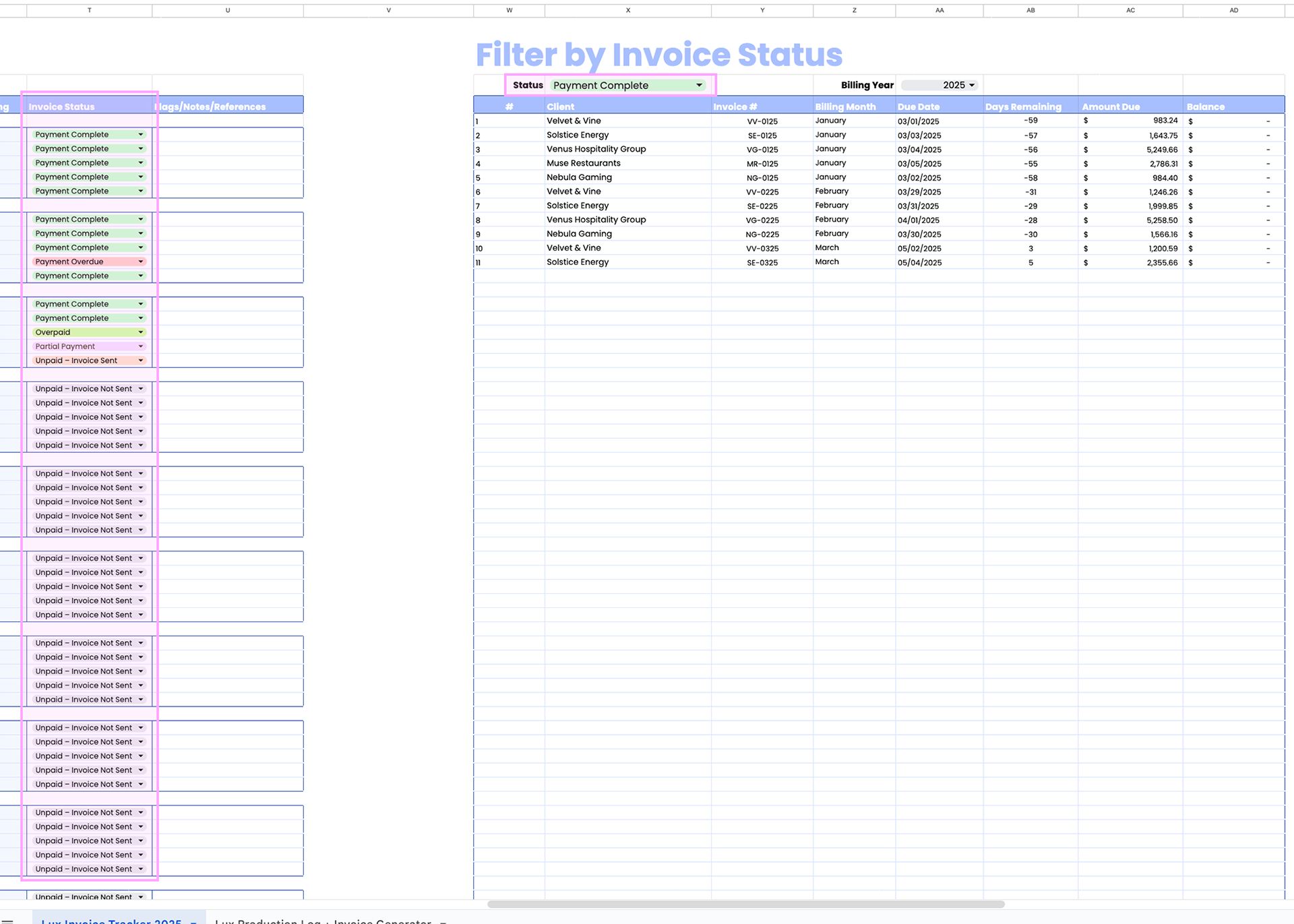
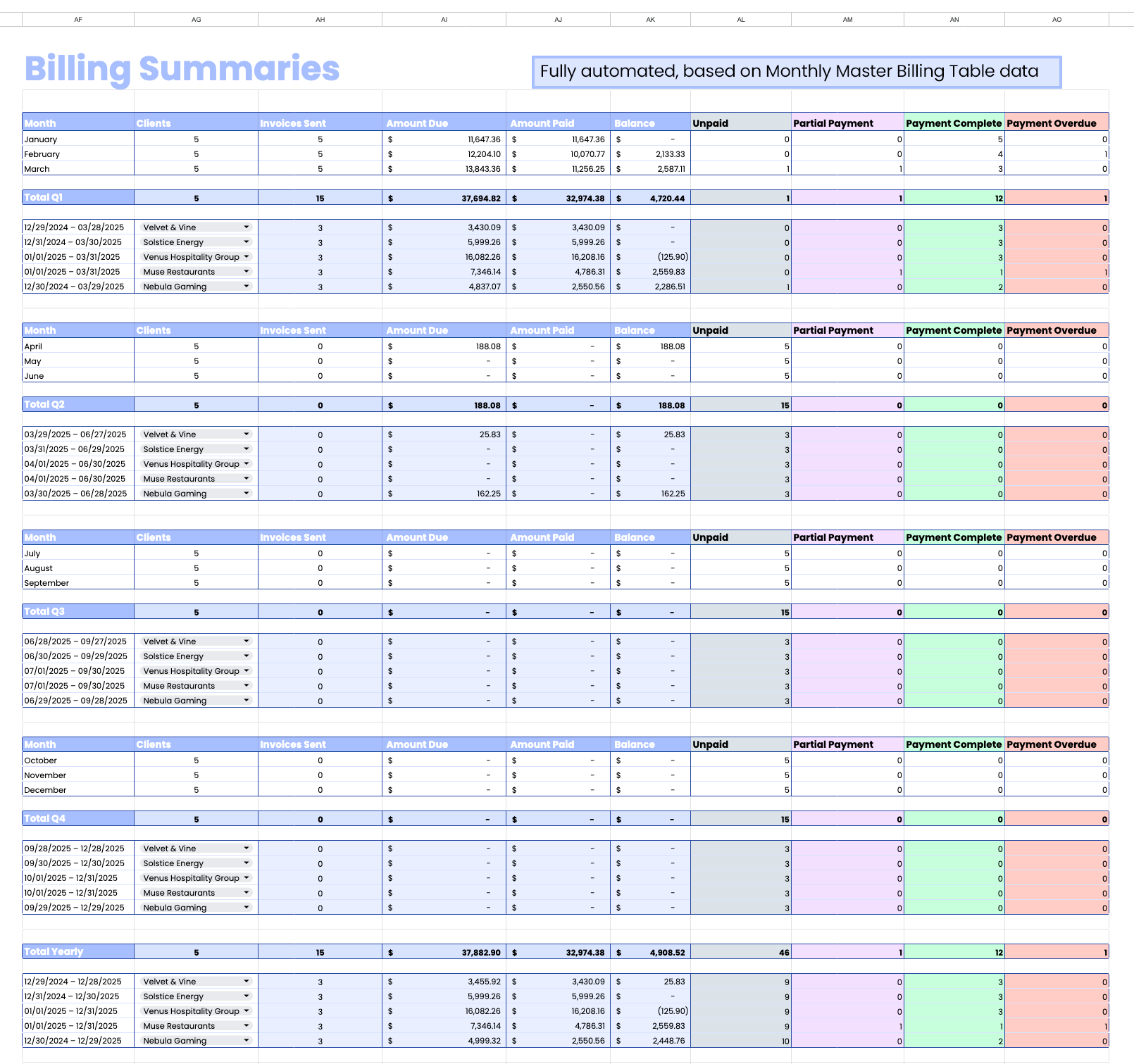
This sheet consists of 4 sections: Add Invoice Payments, Monthly Master Billing Table, Filter by Invoice Status, and Billing Summaries.
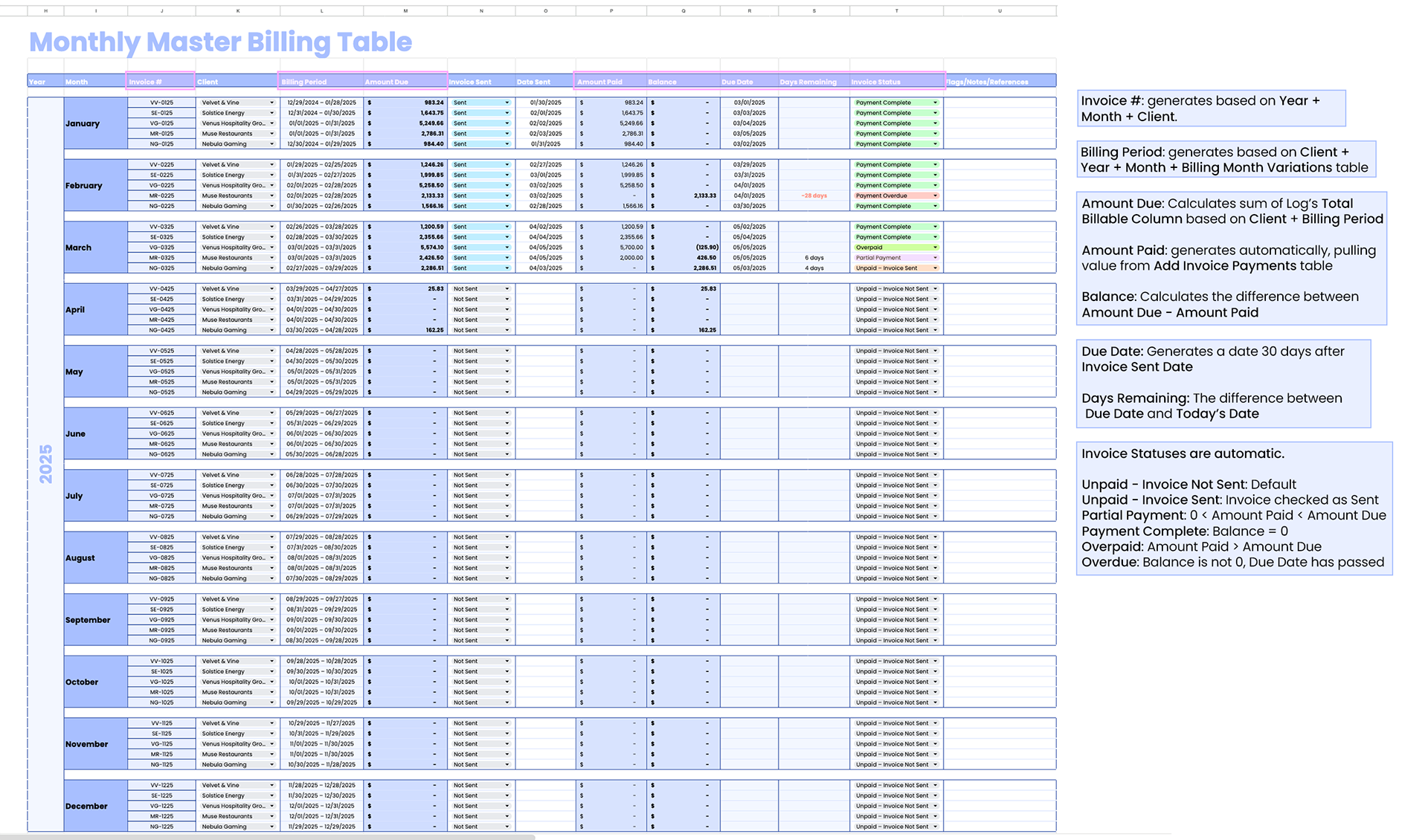
The centerpiece of this sheet is the Monthly Master Billing Table. This table serves as the actual Invoice Tracker, providing invoice-specific billable summaries, as well as comprehensive invoice status data: whether an invoice has been sent, whether it has been paid, and when it is due. This tracker pulls data from both the Production Log and the Add Invoice Payments section.
The centerpiece of this sheet is the Monthly Master Billing Table. This table serves as the actual Invoice Tracker, providing invoice-specific billable summaries, as well as comprehensive invoice status data: whether an invoice has been sent, whether it has been paid, and when it is due. This tracker pulls data from both the Production Log and the Add Invoice Payments section.
Add Invoice Payments serves to keep an organized record of all incoming payments. When an invoice payment is entered, the Amount Paid section of its corresponding invoice updates automatically.
Filter by Invoice Status allows the company to do just that. This is helpful in the event that the sheet is scaled to more than 5 clients, if there is overlap in Invoice due dates (such as if they are sent quarterly, not monthly), or simply to compile all non-fully paid invoices into an organized list grouped by status rather than month.
Billing Summaries serves as an executive overview of the Invoice Tracker/Billing Table. It is fully automated.
Below is a more in-depth visual guide for each section outlining their automations, along with three videos: one illustrating the Tracker's data entry workflow and one illustrating the Filter by Invoice Status in action.
Invoice Tracker Data Entry Workflow: Invoice Sent & Date Automations
Invoice Tracker Data Entry Workflow: Add Invoice Payments Automations
Filter by Invoice Status
A Note on Data Integrity & Privacy
While the logistical requirements for this project were inspired by a real-world technical challenge, I have taken extensive steps to prioritize data privacy. To demonstrate the system's architecture safely, I engineered a completely synthetic dataset. Every client name, job identifier, and production metric has been randomized or synthetically adjusted to ensure total anonymity while maintaining the functional complexity of the 500+ entry model.
While the logistical requirements for this project were inspired by a real-world technical challenge, I have taken extensive steps to prioritize data privacy. To demonstrate the system's architecture safely, I engineered a completely synthetic dataset. Every client name, job identifier, and production metric has been randomized or synthetically adjusted to ensure total anonymity while maintaining the functional complexity of the 500+ entry model.